
If you have Mercedes-Benz with Command NTG 5.0/5.1/5.5 system, when install the Android GPS screen, it might have a problem in few cars (not every car, just only in few car types), the problem is : When you play a video from Android screen, the sound delay the picture (the picture of video moved, but the sound delay about 2~3 seconds in speaker).
To handle this problem, one solution is add the DSP (Extra cost):
To handle this problem, one solution is add the DSP (Extra cost):
1, What is the standard parts we offer?
For Mercedes NTG 5.0/5.1/5.5 model, our default parts/accessories is :
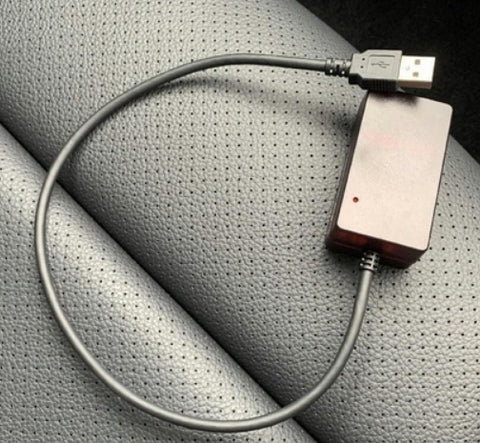
offer a USB/AUX audio box ( as below photo), to transfer the audio by USB,
in most case, it don't have this problem, most of car types using this kind of USB/AUX adapter and without problem.
5, How to check if your car with "PANASONIC" radio head unit? or other brand?
(3) One more way to test it.
offer a USB/AUX audio box ( as below photo), to transfer the audio by USB,
in most case, it don't have this problem, most of car types using this kind of USB/AUX adapter and without problem.
2, What kind of car types/model might have "Audio delay problem"?
After we research and case study, the car with PANASONIC Radio Head unit with have this problem, also, if the car with Burmester sound system, it also have this problem. To handle this problem, it need to add a DSP module, to have the sound go to speaker directly (not go through USB), that way,the audio will not delay.
If your radio head unit is other brand, such as "MITSUBISHI" or "Harman Kardon", in most case, it don't have this problem.
3, What is the extra cost for DSP?
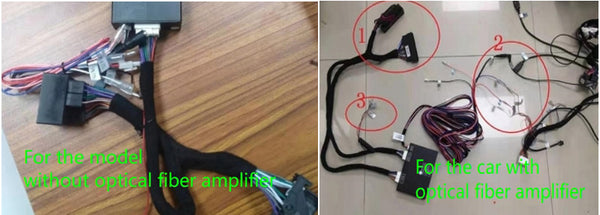
DSP have two types, that need to check if your car with or without optical fiber amplifier,then choose the correct one:
(1) if the car without optical fiber amplifier, the DSP is USD50.00
(2) If the car w/ optical fiber amplifier, the DSP is USD100.00
(2) If the car w/ optical fiber amplifier, the DSP is USD100.00
The DSP box link as below:
4, How to identify the car with an Optical fiber amplifier?
(When your car is PANASONIC head unit, check these info)
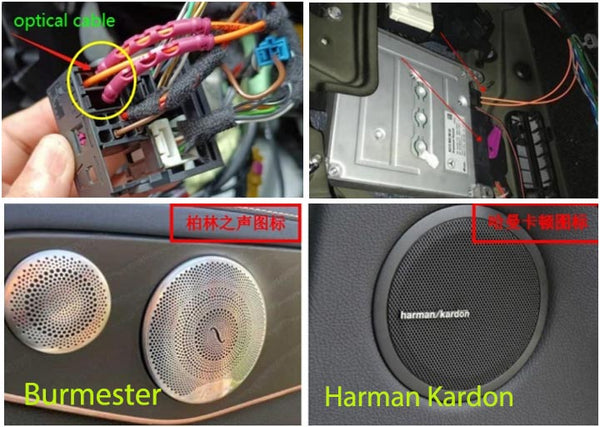
(1) Check the cable in original power cable (the back OEM radio head unit)
it have optical fiber cable.
(2) See the speakers, if it have this two brand on it (Harman Kardon) or (Burmester), that is optical fiber amplifier for sure.
(3) On the tailgate box (the left side), see if it has optical fiber amplifier.
5, How to check if your car with "PANASONIC" radio head unit? or other brand?
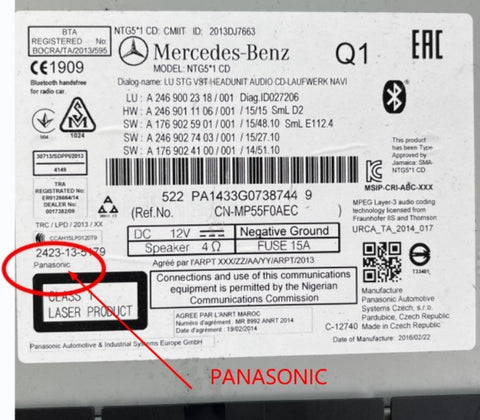
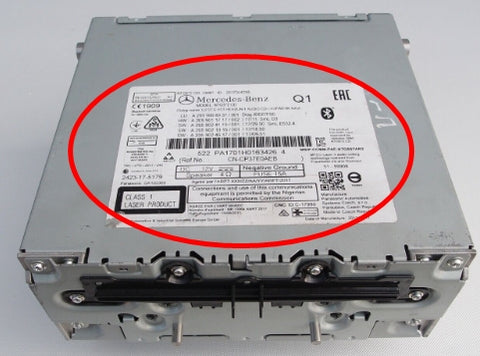
(1) The only way is to remove the trim panel, take out the radio head unit,
on top of radio unit, it stick a paper, it show the brand of radio head unit.
If that is Panasonic head unit, you can continue to check the power cable,
to check if it has optical fiber cable or not (as the method mentioned above).
you can send the photo to us, to double check with you.
you can send the photo to us, to double check with you.
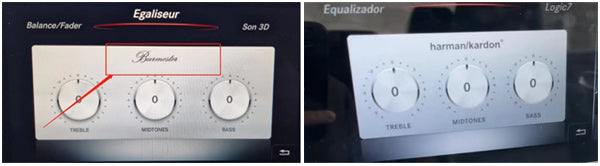
(2) You can get into the original menu, under the "media", it have one option "sound effect" When it show "Harman Kardon" or " Burmester", this car type will have external optical amplifier for sure.
But it still need to check the "brand" of radio head unit (still need to remove the dashboard and take out the head unit)
(3) One more way to test it.
(1) Connect your phone to car Bluetooth, activate the "Bluetooth audio"
to play a song/music first, it have sound in speakers,
(2) and then play ANY VIDEO from the cellphone,
you can see the video from the phone, and feel the sound from the speaker, to see if it have
delay or not (normally 2~3 delay, we call audio delay).
